How to transfer files from Android to Mac
Install the ZiggSend app on your Android (free, on Google Play) and on your Mac, connect them once and send. It’s easy and free, with no ads. Photos, videos and any file land in a folder on your Mac with no quality loss, verified byte for byte. No account, no cloud.
This guide is for Android and Mac: open this page on one of them, or send the link with “Send to someone”.
What you need
- A Mac or MacBook with macOS 14 (Sonoma) or newer
- Android 7 or newer
- Both on the same Wi-Fi (your home wifi works), or a USB data cable
How long it takes
In our tests, an 806 MB video went from a Galaxy S25 Ultra to a Mac in 46 s over Wi-Fi, and 22 GB (184 files) went over a USB 2 cable in about 13 minutes. Your time depends on your network and devices. How we measure →
Over Wi-Fi, step by step
The everyday way: phone and Mac on the same network, no cable.
On Android, get it free on Google Play. On the Mac, download the Mac app. It’s the same ZiggSend on both sides.
On Android, tap “Connect to a computer”. The Mac shows up under “Devices nearby”: tap it, check that the security code matches on both screens and click “Allow” on the Mac. Not there? Tap “Scan the QR code” and point at the code the Mac shows under “Connect phone”.
Tap “Send photos and videos”, check what you want in Android’s picker and confirm. For PDFs and other files, use “Send documents, PDFs, ZIPs…”.
On the Mac, files show up under “Arrived here”, each marked “arrived intact”. “Show in folder” shows each one in Finder.
By cable, step by step
For a lot at once. Android to Mac only: the Mac app pulls straight from the phone, no phone app needed.
- 1
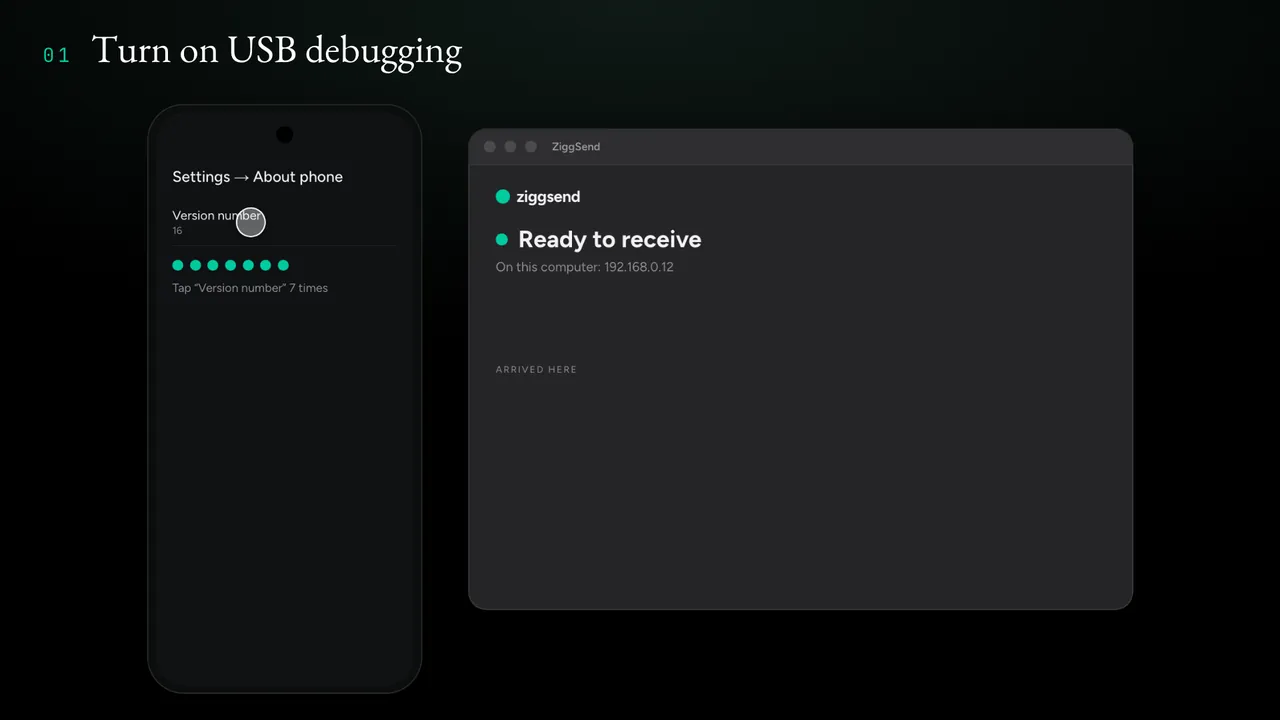
Turn on USB debugging on Android
In Settings → About phone, tap “Version number” 7 times. Then, in “Developer options”, turn on “USB debugging”. The path varies a little by brand, and the Mac app shows the one for your phone.
- 2
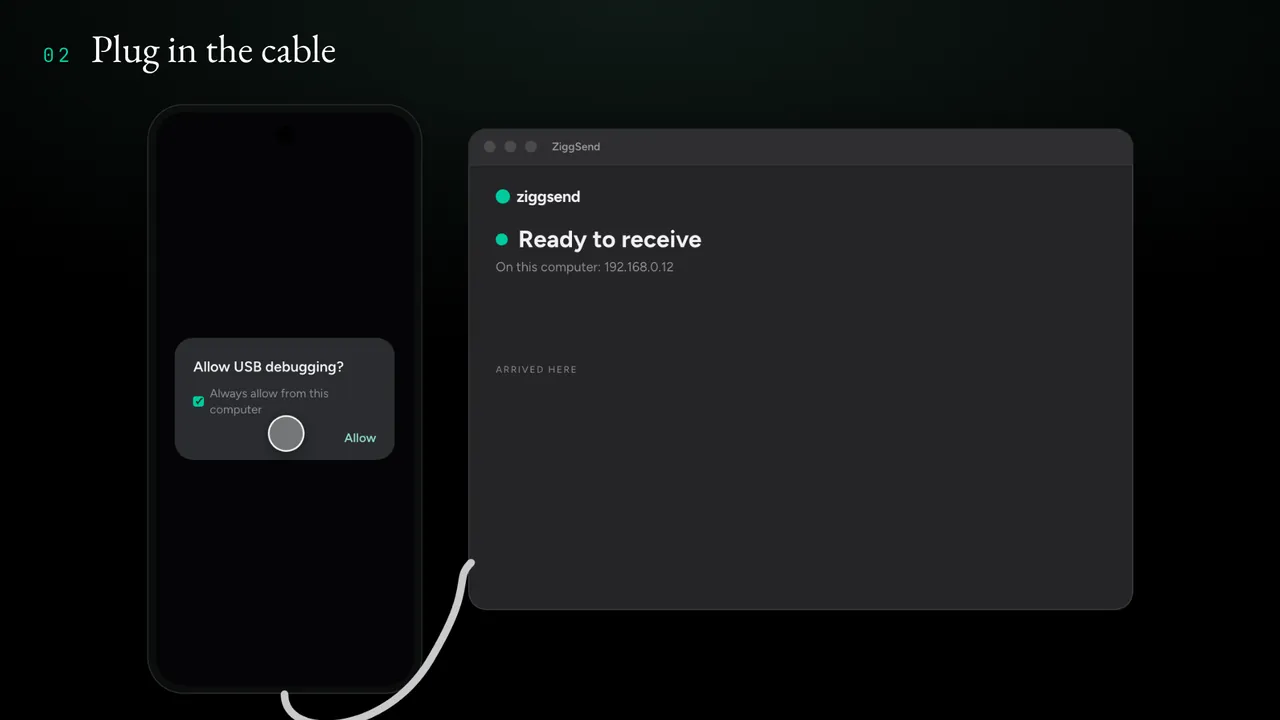
Plug in the cable
Connect the phone to the Mac with a data cable. On the phone, tap “Allow USB debugging” and check “Always allow from this computer”.
- 3
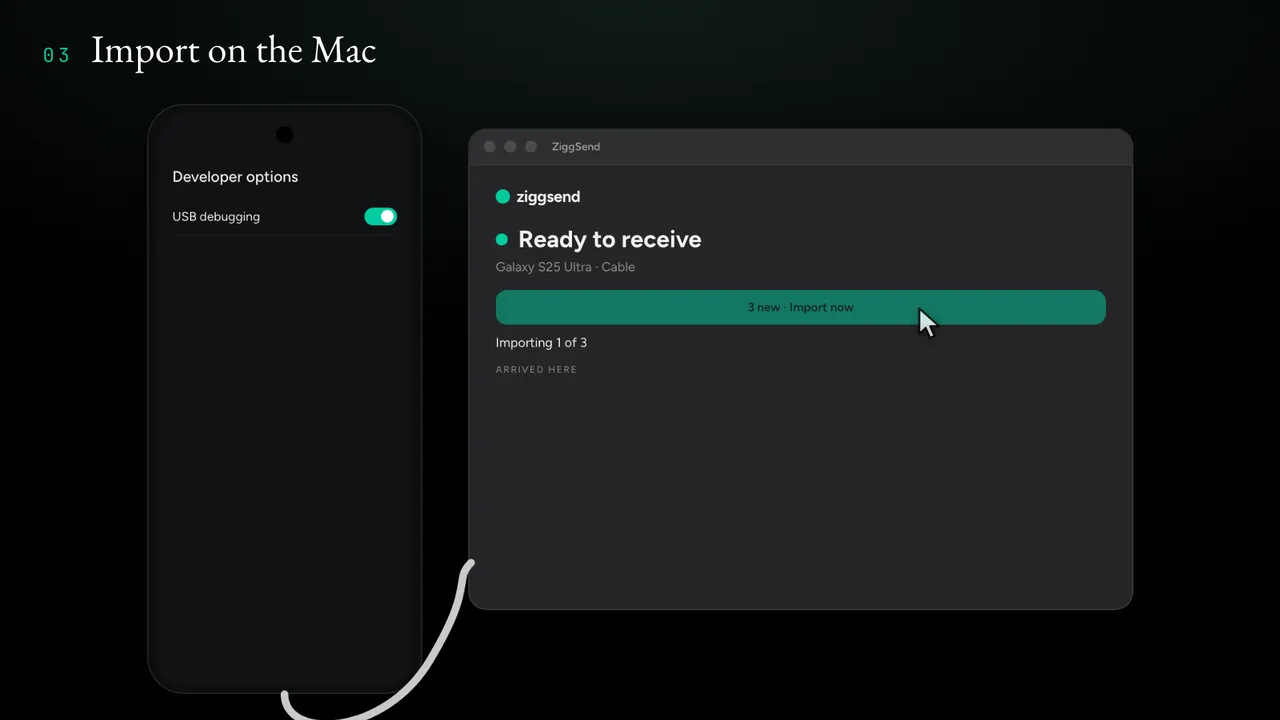
Import on the Mac
The Mac shows how many files are new. Click “Import now”.
- 4
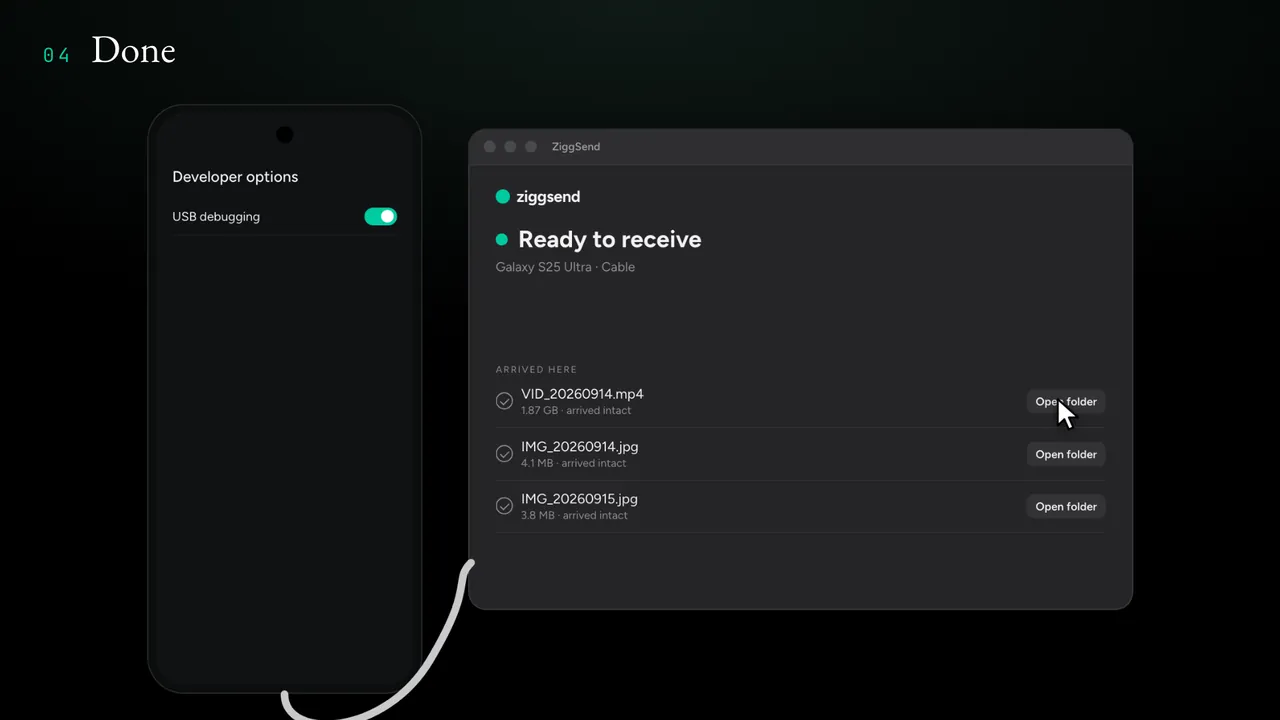
Done
Files show up under “Arrived here”, marked “arrived intact”. Next time, just plug in the cable.
Other ways (Android → Mac)
What each option does, only with facts you can check at the source.
| Option | How it moves | Good to know | Source |
|---|---|---|---|
| Android File Transfer | USB cable (MTP) | Google removed the download in 2024. What happened → | 9to5Google |
| OpenMTP | USB cable (MTP) | Free and open source. | GitHub |
| Quick Share | Wireless | The official app is for Android, Chromebook and Windows; there is no Mac app. | Google Help |
| ZiggSend | Wi-Fi or cable | Free with 1 phone; checks every file byte for byte (on the cable, if the phone cannot compute the fingerprint, by exact size). | How we measure |
What can go wrong (and what to do)
The Mac doesn’t show up in the list
Both need to be on the same Wi-Fi (one on Wi-Fi and the other on mobile data won’t work). Guest, hotel and office Wi-Fi often isolates devices: use your home Wi-Fi or put the Mac on your phone’s hotspot. Turn off any VPN. Still nothing? Use “Scan the QR code” or the cable.
I turned the screen off mid-transfer
On Android, sending keeps going with the screen off when ZiggSend’s notification is allowed. Without it, the app asks you to keep the screen on until it finishes.
The Wi-Fi dropped
Just send again: it picks up where it stopped. A file that fails the check never goes into the folder, and the app tells you.
On the cable, the Mac doesn’t see the phone
A charge-only cable won’t work: use a data cable. Check that “USB debugging” is on and that you tapped “Allow USB debugging” on the phone. On Samsung phones, Auto Blocker stops debugging: turn it off first.
The app won’t open on the Mac
It needs macOS 14 (Sonoma) or newer. To check yours: Apple menu → About This Mac.
Questions from people about to do this
Does it lose quality?
No. The file arrives identical to the one on the phone, verified byte for byte: photo, 4K or HDR video, document. On the cable, if the phone cannot compute the fingerprint (an older Android, for example), the check is by exact size.
Do the photos leave my phone?
No. ZiggSend only copies: nothing is deleted from your phone. If you want to free up space, delete them yourself after you check them on the Mac.
Do I need internet?
Not to transfer: just the phone and the Mac on the same Wi-Fi, or the cable. Your files never go through a server.
Is there a size limit?
No, not even on the Free plan.
Do I need an account?
No. No sign-up.
Is it free?
Yes: the phone app is free, and the Mac app is free forever with one phone. Pro is optional, for several phones, full history and automatic folders.
Android File Transfer stopped working. Does this replace it?
Yes. Google no longer offers Android File Transfer (what happened); ZiggSend covers the same route over Wi-Fi or by cable, and checks every file.
Is it safe?
Yes. The file goes straight from the phone to the Mac over your own network, with the content encrypted (AES-256), and never through a server. To connect, you check that the same code shows on both screens.
Are there ads?
No, not even on the Free plan.
Does it work on my Samsung, Xiaomi or Motorola?
Yes, on any Android 7 or newer. For the cable on Samsung phones, turn off Auto Blocker first, since it blocks USB debugging.
And without Wi-Fi?
Use the cable (Android to Mac) or put the Mac on the phone’s hotspot: then both are on the same network.
And from the Mac to Android?
That too: drag files onto the ZiggSend window on the Mac or use “Send files”.